The photography landscape has transformed dramatically. Gone are the days when perfecting your images meant spending hours mastering complex manual editing techniques. Today, artificial intelligence photo editing has revolutionized how we enhance, retouch, and transform photographs. Whether you’re a professional photographer managing thousands of shots or a content creator looking to make quick edits, AI photo editor apps have become indispensable tools in modern workflows.
The challenge isn’t finding an AI image editing tool—it’s identifying which one aligns perfectly with your specific needs, budget, and skill level. The market now offers dozens of options, each promising to deliver professional-quality results with minimal effort. From AI-powered image enhancement to intelligent background removal, the capabilities seem endless. However, not all AI photo editing software is created equal. Some tools excel at portrait retouching, while others shine at landscape photography. Some offer one-time purchases, while others follow subscription models.
This comprehensive guide analyzes the top AI photo editing applications of 2025, comparing their features, pricing structures, ease of use, and real-world performance. We’ve tested each platform extensively to provide honest insights that go beyond marketing claims. Whether you’re seeking the best AI editor for beginners, a professional-grade AI photo enhancement solution, or a specialized tool for specific editing tasks, this article will help you navigate the crowded landscape of intelligent photo editing technology and make an informed decision that elevates your creative work while respecting your budget and technical comfort level.
AI Photo Editing: What Makes It Different?
AI photo editing represents a fundamental shift in how photographers approach image enhancement. Unlike traditional editing software that requires users to manually adjust sliders, tweak curves, and apply filters, artificial intelligence image editing automates much of the heavy lifting through machine learning algorithms. These intelligent systems analyze your photographs and make context-aware adjustments that would typically require hours of manual work.
The core philosophy behind AI-driven photo editors is straightforward: free photographers from mundane, repetitive tasks so they can focus on creative decisions. The technology behind machine learning photo enhancement learns from millions of images to understand lighting patterns, color theory, facial anatomy, and compositional principles. When you upload a photo to an intelligent editing application, the AI doesn’t simply apply a generic filter—it analyzes specific characteristics of your image and makes personalized adjustments.
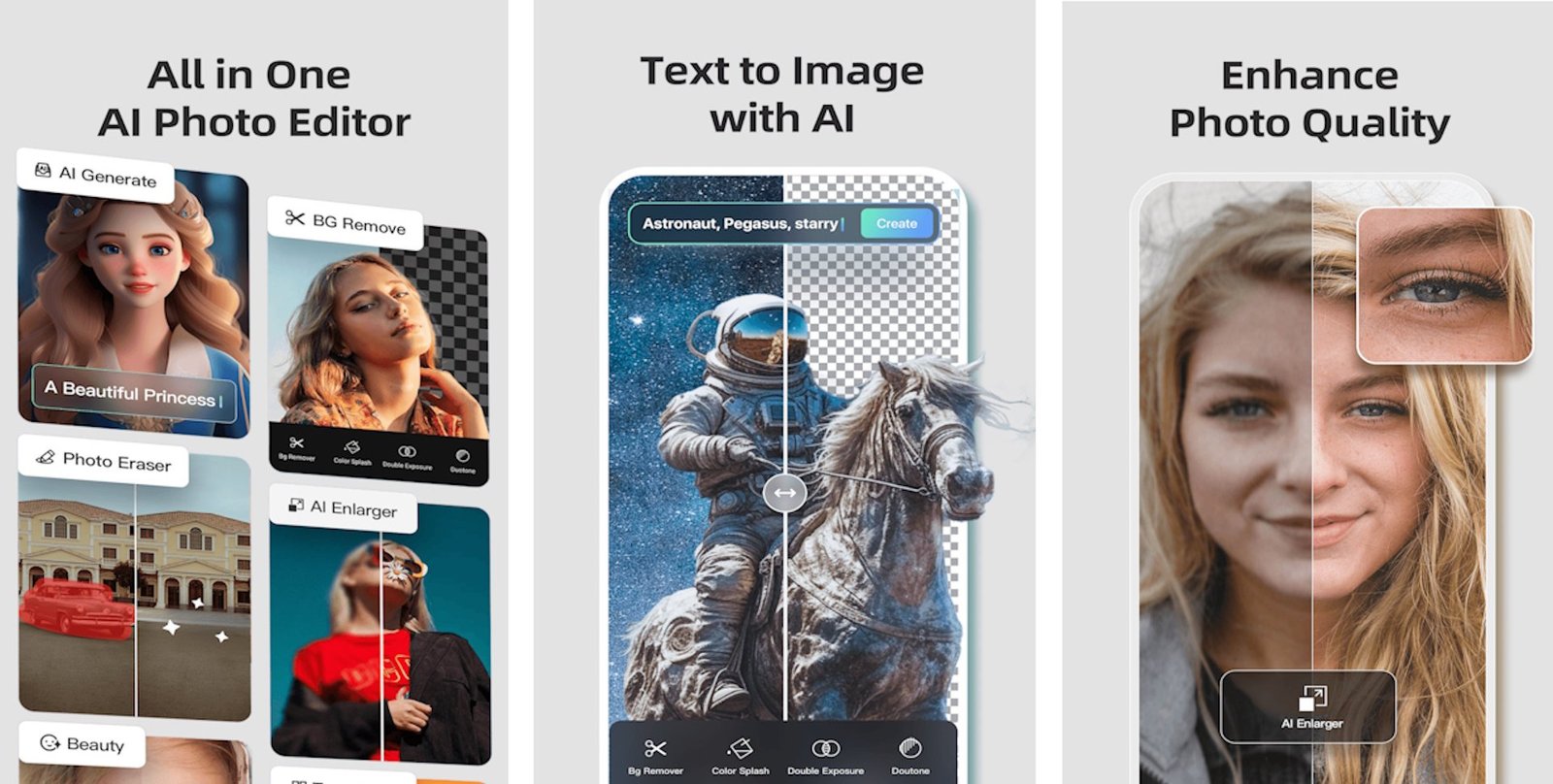
Smart photo editing tools powered by AI can perform tasks that once demanded professional-level expertise. Automated image enhancement now handles complex operations like intelligent sky replacement, where the algorithm analyzes your image’s lighting and perspective to seamlessly integrate a new sky. Neural network photo editing enables precise background removal without manual masking. Generative AI image tools can add elements that weren’t in your original photograph based on simple text prompts.
The distinction between AI photo editors and traditional software lies in their approach to problem-solving. Traditional editors empower users with granular control but demand technical knowledge. Modern AI-assisted editing platforms prioritize speed and accessibility while offering users the option to fine-tune automated results. This hybrid approach makes AI photo enhancement software suitable for everyone, from complete beginners to seasoned professionals seeking workflow efficiency.
Top AI Photo Editing Apps Detailed Comparison
1. Luminar Neo: The Best Overall AI Photo Editor
Luminar Neo stands out as the most comprehensive AI-powered editing application available today. Developed by Skylum, this intelligent photo editor combines over 25 AI-driven tools with an interface that balances power and accessibility. What makes Luminar Neo photo editing software exceptional is its refusal to compromise between automation and creative control.


The standout feature is Accent AI, a revolutionary tool that simultaneously handles multiple adjustments—shadows, highlights, contrast, exposure—through a single slider. Rather than toggling between different adjustment panels, users can achieve professional-grade AI image enhancement in seconds. The Sky AI feature automatically analyzes your image and replaces skies with alternatives that match the original lighting and perspective perfectly. For landscape photographers, the Water Reflection technology seamlessly enhances water elements in your photos.
Luminar Neo pricing offers flexibility with both subscription and one-time purchase options, making it cost-effective for long-term users. The software works on Windows and macOS, with excellent performance even on older machines. For anyone asking “what is the best AI photo editor overall,” Luminar Neo consistently ranks at the top due to its breadth of tools, intuitive interface, and genuine improvements to editing speed without sacrificing quality.
2. Adobe Photoshop: Professional-Grade AI Editing Power
- Adobe Photoshop has evolved into an AI powerhouse with the integration of Adobe Firefly, a proprietary generative AI model trained on Adobe Stock images. The Generative Fill feature in Photoshop AI editing represents a quantum leap in what professional photo editing software can accomplish. Simply select an area of your image and describe what you want—the AI generates realistic content that matches your image’s lighting, perspective, and color grading.
- Adobe Photoshop Generative Fill excels at complex tasks like removing unwanted objects, extending backgrounds, or adding elements that weren’t in your original shot. The Neural Filters in Photoshop AI tools allow unprecedented control over facial expressions, age, skin texture, and lighting. The Reference Image feature enables you to guide the AI using visual inspiration rather than text alone, addressing situations where words fall short.
However, Adobe Photoshop AI pricing follows a subscription model without perpetual licensing options. For professionals already invested in the Creative Cloud ecosystem, integrating Photoshop’s AI features into existing workflows is seamless. The learning curve for beginners remains steep, but the raw capability and precision justify the investment for serious photographers and creative professionals working on demanding projects.
3. Canva: The Most Accessible AI Photo Editor
Canva photo editor democratizes professional-quality AI image editing for users without technical expertise. As an online photo editing platform, Canva excels at making AI photo enhancement accessible through its intuitive interface and drag-and-drop functionality. The Magic Eraser removes unwanted elements instantly, while Magic Design generates complete design layouts from simple prompts.
What distinguishes Canva’s AI editing features is their integration into a broader design ecosystem. Users can edit photos, create social media posts, design presentations, and collaborate with team members—all within one platform. The Canva background remover performs one-click background removal that actually works reliably. For social media content creators, small business owners, and marketing teams, Canva AI tools offer exceptional value and speed.
The primary limitation of Canva AI photo editing is the depth of control available to advanced users. For straightforward editing tasks and social media optimization, Canva’s intelligent editing capabilities are perfect. However, photographers seeking pixel-level precision might find the available adjustments limiting. Canva’s AI photo editor pricing offers free and premium tiers, making experimentation risk-free.
4. Picsart: The Creative Suite Champion
- Picsart photo editor positions itself as more than just an editor—it’s a complete creative ecosystem for over 150 million creators worldwide. The AI-powered editing tools in Picsart work alongside stickers, templates, drawing capabilities, and a massive asset library. The AI Image Generator converts text prompts into images, while AI Expand intelligently extends image boundaries using content-aware technology.
- Picsart’s background remover performs reliably across various images. The Batch Editor feature enables efficient editing of multiple photos simultaneously, perfect for content creators managing large campaigns. Picsart’s AI tools include AI Remove for object elimination and AI Replace for background substitution. The platform supports seamless collaboration, allowing team members to access and edit shared content without creating duplicate files.
- Picsart subscription pricing offers both free features and premium tiers. While the free version includes most AI capabilities with limited daily usage, the Pro subscription unlocks unlimited access. Picsart AI photo editing appeals particularly to social media creators, digital marketers, and content teams requiring efficient, collaborative editing workflows with professional results.
5. Lensa: The Portrait Retouching Specialist
- Lensa photo editor built its reputation on two pillars: sophisticated portrait retouching and its famous Magic Avatars feature. While Magic Avatars generates artistic interpretations of your photos in various styles, Lensa’s core strength lies in intelligent portrait enhancement. The app makes complex retouching accessible through intuitive sliders, allowing users to smooth skin, erase eye bags, and apply artistic background blur without technical knowledge.
- Lensa’s AI portrait editor leverages neural network technology to understand facial anatomy and apply enhancements that look natural rather than artificially smoothed. The artistic portrait effects enable creative experimentation while maintaining photorealistic quality. For anyone focused on selfie enhancement or professional headshot editing, Lensa’s AI retouching capabilities deliver impressive results with minimal effort.
- Lensa pricing follows a subscription model with tiered options. The free version includes basic features, while premium subscriptions unlock unlimited access to advanced AI portrait tools and Magic Avatars generations. Lensa photo editing particularly appeals to influencers, professionals maintaining social media presence, and content creators emphasizing portrait imagery.
6. Adobe Lightroom: The Professional Workflow Choice
- Adobe Lightroom has evolved from a photo management tool into a comprehensive professional AI editing platform. While not as visually dramatic as Photoshop’s AI capabilities, Lightroom’s intelligent photo editing features excel at the work photographers do daily: managing large libraries, applying consistent edits across batches, and fine-tuning individual images.
- Lightroom AI features include Sky Replacement, Texture Enhancement, and intelligent masking powered by machine learning. The software learns your editing preferences over time, enabling personalized AI editing suggestions that accelerate your workflow. For photographers managing hundreds or thousands of images from a single shoot, Lightroom’s batch processing capabilities combined with AI-assisted adjustments are unmatched.
- Adobe Lightroom subscription pricing integrates seamlessly with the broader Creative Cloud ecosystem. The Lightroom Plus standalone subscription offers better value for users not require the full Creative Suite. Photographers invested in Adobe’s professional photo editing ecosystem find Lightroom’s AI integration enhances rather than disrupts established workflows.
7. ON1 Photo RAW: The Modular Approach
ON1 Photo RAW takes a unique modular approach to AI photo editing software, allowing photographers to customize their toolset with specialized AI add-ons. The platform’s core strength lies in automated noise reduction through NoNoise AI, which preserves detail better than competing solutions. The Resize AI intelligently upscales images for printing without degradation. Portrait AI handles automatic retouching with customizable controls.
What makes ON1’s approach distinctive is the Keyword AI feature, which automatically tags photos for faster searching and improved file management. This addresses a pain point in professional workflows where organizing large libraries consumes excessive time. ON1 Photo RAW’s modular design enables photographers to invest in features most relevant to their specific needs while maintaining flexibility.
ON1 Photo RAW pricing offers both one-time purchase and subscription options, making it cost-effective compared to perpetual subscription models. Performance remains solid even on older hardware. For photographers seeking a customizable AI editing suite without unnecessary features, ON1 delivers professional results with a thoughtful interface.
Comparing AI Photo Editing Features: What Should You Prioritize?
When evaluating AI photo editor applications, which features matter most for your specific use case simplifies decision-making. Different photographers have different priorities, and the best AI photo editing software for wedding photographers differs from the ideal tool for social media content creators.
- Portrait Retouching Capabilities: If facial enhancement matters most, Lensa and Adobe Photoshop excel with natural-looking results. Luminar Neo also offers solid AI portrait adjustment tools.
- Landscape and Sky Enhancement: Luminar Neo’s Sky AI and Adobe Lightroom’s Sky Replacement deliver outstanding results. ON1 Photo RAW provides reliable alternatives with customizable controls.
- Batch Processing Speed: Aftershoot, Imagen, and Adobe Lightroom process hundreds of images efficiently, ideal for high-volume photographers. Picsart’s Batch Editor suits content creators managing social campaigns.
- One-Time Purchase Options: Luminar Neo and ON1 Photo RAW offer perpetual licenses, preventing subscription fatigue. Adobe products require ongoing subscriptions.
- Learning Curve and Accessibility: Canva and Picsart prioritize ease of use for beginners. Adobe Photoshop and Lightroom Classic demand technical knowledge but reward investment with advanced capabilities.
- Mobile Integration: Lensa, Picsart, and Canva offer seamless mobile apps, ideal for on-the-go editing. Desktop applications like Luminar Neo and Adobe Photoshop deliver superior performance but lack mobile versions.
Pricing Models: Investment Considerations for Different Users

- AI photo editor pricing helps align software choices with budgetary constraints and long-term value expectations. The industry offers multiple models, each with distinct advantages and drawbacks.
- Subscription-Based Models: Adobe Photoshop, Adobe Lightroom, Picsart Pro, and Lensa follow monthly or annual subscriptions. This model ensures regular updates and new features, but creates ongoing costs. Adobe Creative Cloud subscriptions cost approximately $54.99 monthly, while specialized tools like Lightroom Plus start around $9.99 monthly.
- One-Time Purchase Options: Luminar Neo and ON1 Photo RAW offer perpetual licenses with optional paid updates. Initial investment ($99-$149) recouped within 2-3 months compared to subscription costs, making them economical for committed users.
- Freemium Models: Canva, Picsart, Google Photos, and Pixlr offer free versions with limited AI feature access. Premium features unlock through paid subscriptions, perfect for casual users wanting professional results without commitment.
- Credit-Based Systems: Some platforms like Pixlr use AI credits, where each feature consumes a certain number of credits, offering granular spending control for occasional users.
For professionals using AI editing daily, subscription models average $120-660 annually. One-time purchase options ($99-150) become increasingly attractive, offering better long-term value. Casual users benefit from freemium options, accessing quality editing without financial commitment until their needs justify paid upgrades.
Real-World Performance: Accuracy and Quality Assessment
- AI photo enhancement accuracy varies significantly between platforms, influenced by training data, underlying algorithms, and specific use cases. Comprehensive testing reveals important distinctions between theoretical capabilities and actual results.
- Sky Replacement Accuracy: Luminar Neo’s Sky AI and Adobe Photoshop’s Generative Fill deliver photorealistic results that maintain proper lighting and perspective. The replacements look natural when zoomed to full resolution. Lightroom’s Sky Replacement performs slightly better on dramatic skies but occasionally struggles with complex edges.
- Object Removal Quality: Photoshop’s AI-powered removal and Canva’s Magic Eraser excel at eliminating unwanted elements from uncomplicated backgrounds. Complex scenarios with texture or pattern backgrounds require more manual refinement. Picsart’s AI Remove handles moderately complex backgrounds reasonably well.
- Portrait Enhancement Credibility: Lensa’s portrait retouching produces natural-looking results maintaining facial recognition authenticity. Edits remain subtle and realistic. Adobe Photoshop’s Neural Filters offer more aggressive adjustments for users wanting dramatic transformations, while Luminar Neo strikes a middle ground.
- Background Removal Precision: All major platforms perform reliably on straightforward subjects against uniform backgrounds. Complex scenarios with fine details—hair strands, semi-transparent areas—reveal differences. Photoshop and Lightroom maintain better edge definition than mobile-focused apps.
- Noise Reduction Natural Preservation: ON1’s NoNoise AI and Topaz Photo AI preserve texture while reducing noise more effectively than competitors. Adobe’s Super Resolution and Luminar Neo’s Enhance AI also perform exceptionally well.
Workflow Integration and Compatibility
- AI photo editing software’s effectiveness depends partially on how seamlessly it integrates into existing photography workflows. Photographers using specific tools prefer AI editors that work alongside rather than replace established systems.
- Adobe Ecosystem Integration: Photoshop, Lightroom, and Bridge function seamlessly within Creative Cloud. Users can apply AI edits in one application, refine in another, and manage across the entire suite without friction. This integration justifies subscription costs for professionals managing entire creative workflows.
- Standalone Applications: Luminar Neo, ON1 Photo RAW, and specialized tools function independently or as plugins for Lightroom Classic and other editors. This flexibility appeals to photographers not fully committed to Adobe’s ecosystem.
- Mobile-Desktop Synchronization: Canva, Picsart, and Lensa enable seamless editing across devices. Start editing on your smartphone, continue on your desktop, and maintain consistency. Adobe’s cloud sync offers similar functionality for Creative Cloud subscribers.
- Plugin Support: Many photographers maintain preferred workflows with specific tools. ON1 Photo RAW, Luminar Neo, and Topaz Photo AI function as plugins within Lightroom Classic, respecting user preferences while enhancing capabilities with AI technology.
More Read: AI Photo Editing Apps Transform Your Images Like a Pro
Conclusion
Selecting the best AI photo editing app depends on your specific priorities, technical skills, and budget. Luminar Neo stands out for photographers seeking comprehensive AI-powered editing with one-time purchasing and an intuitive interface—making it the best overall choice for most users. Adobe Photoshop delivers unmatched precision and capability for professionals willing to embrace subscription costs and steeper learning curves. Canva democratizes professional-level AI editing for beginners and social media creators, while Picsart excels for content teams requiring collaborative, efficient workflows.
Lensa focuses specifically on portrait enhancement, and Adobe Lightroom remains the industry standard for photographers managing large image libraries with AI-assisted batch processing. Whether you prioritize speed, creative control, affordability, or specialized features, the modern AI photo editing landscape offers solutions for every photographer. Test multiple platforms through free trials or versions before committing, as the best AI image editor ultimately matches your unique creative vision and workflow requirements. The future of photography is intelligent, efficient, and increasingly accessible to photographers of all skill levels.